The four quadrants
The matrix is a two-by-two grid. Urgency runs across the top, importance down the side. The colours below are the ones Eisenhower Matrix for Todoist uses for each quadrant.
Do it now, one at a time.
- A client deliverable due today
- A bug that blocks customers
- A bill due tomorrow
Give it a date or a time block.
- Planning next quarter
- Exercise and health check-ups
- Writing the proposal before it is due
Hand it off, batch it, or say no.
- Meetings where you only listen
- Routine requests and forms
- Ordering supplies, booking travel
Drop it, or park it for later.
- Reorganising files that work fine
- “Someday” ideas
- Aimless scrolling
Do First: urgent and important
These tasks have a near deadline and a real cost if they slip: a client deliverable due today, a bug that blocks users, a bill that is due. Do them now, one at a time. If this quadrant is always full, that is a sign that Schedule work is being left until it turns into an emergency.
Schedule: important, not urgent
This is where most long-term value lives: planning the week, writing the proposal before it is due, exercise, learning, fixing the process that keeps breaking. Nothing forces these tasks to happen, so give them a date or a time block. Many people find the matrix worth using mainly because it makes this quadrant visible.
Delegate: urgent, not important
These tasks feel pressing because someone is waiting, but they do not advance your own goals: many meetings, routine requests, some messages. Hand them to someone better placed, automate them, batch them into one short slot, or say no. If you work alone, “delegate” often means “do it quickly and with minimum effort”.
Backlog: neither urgent nor important
Ideas, someday items and low-value busywork. Keep them out of your daily list. Review the backlog now and then: promote what has become important and delete the rest. Deleting is a valid outcome.
Where the name comes from
The method is named after Dwight D. Eisenhower. In a 1954 speech he said, quoting a former college president, that he had two kinds of problems, the urgent and the important, and that the urgent are not important and the important are never urgent. Stephen Covey later turned the idea into a two-by-two “time management matrix” in The 7 Habits of Highly Effective People (1989). That grid is what most people now call the Eisenhower Matrix, the Eisenhower Box or the urgent–important matrix.
How to tell urgent from important
The two axes are independent, and mixing them up is the most common reason the matrix stops helping. Ask them separately.
- Urgent is about time.
- A task is urgent if waiting has a cost soon: it has a hard deadline in the next day or two, or something breaks if it is not done. “Someone asked for it” is not the same as “it is urgent”.
- Important is about outcomes.
- A task is important if it contributes to your goals, your responsibilities or your values, whoever asked for it. How loud a task is says nothing about its importance.
If you hesitate on either question, treat the answer as “no”. That keeps Do First small, which is the point: a short Do First list is one you can actually finish.
A 30-second decision checklist
Run each task through these questions, in order. Most tasks are decided by the second one.
- Is there a real deadline in the next day or two, with a cost if it slips? If yes, it is urgent.
- Does it move a goal, a commitment, your health or a relationship forward? If yes, it is important.
- Would you still do it if nobody asked? If yes, that is another sign it is important.
- Could someone else do it well enough? If it is urgent but not important, that is a Delegate task.
- Would anyone notice in a month if it disappeared? If not, it belongs in the Backlog, or in the bin.
Worked examples
The same kind of task can land in different quadrants depending on its deadline and why it matters to you. These are typical calls.
| Task | Urgent? | Important? | Quadrant and action |
|---|---|---|---|
| Fix the report a client needs by 5 pm today | Yes, today | Yes, a commitment | Do First: do it now |
| Checkout is failing for customers | Yes | Yes | Do First: drop other work |
| Draft next quarter’s plan, due in three weeks | Not yet | Yes | Schedule: block two hours this week |
| Book the dentist check-up you keep postponing | No | Yes, health | Schedule: pick a date now |
| A weekly status meeting where you only listen | It starts at 10:00 | Low | Delegate: ask for the notes instead |
| A colleague asks you to find a file they could search for | It feels urgent | Not for your goals | Delegate: point them to the folder |
| Reply to a newsletter survey | No | No | Backlog: skip or delete |
| Reorganise your browser bookmarks | No | No | Backlog: leave it; revisit monthly |
Notice the Schedule rows. They are the tasks that quietly turn into Do First emergencies if they never get a date.
A simple daily routine
Collect
Get every open task into one list, the one you already use.
Sort
Put each task in a quadrant. Decide quickly; you can move it later.
Act by quadrant
Work through Do First, give Schedule tasks a date, hand off or batch Delegate tasks, and leave the Backlog alone.
Review every morning
Look at what carried over from yesterday, re-sort anything that changed, and pick the two or three tasks that matter most today.
Prune every week
Open Delegate and Backlog. Delete what no longer matters and promote what has become important.
Common mistakes
- Everything is Do First. If more than a handful of tasks are urgent and important, you are rating urgency by feeling. Re-check the deadlines.
- Confusing urgent with important. A ringing phone is urgent, not automatically important. Loud tasks tend to crowd out valuable ones.
- Never scheduling Schedule. Important-but-not-urgent tasks without a date quietly become urgent later. Give them a slot.
- Treating Delegate as “someone else’s problem”. A delegated task still needs a clear owner and a follow-up.
- Hoarding the backlog. A backlog that only grows becomes noise. Prune it.
- Sorting once and never again. Priorities change as deadlines approach. The matrix works when it is reviewed, ideally every day.
- Keeping the matrix apart from your to-do list. A matrix on paper or a whiteboard drifts out of date within days. It works best on top of the list you already use.
The Eisenhower Matrix in Todoist
If your tasks already live in Todoist, you don’t need a second list. Eisenhower Matrix for Todoist is a web app that connects to your Todoist account and puts the matrix on top of the tasks you already have:
- Your Todoist tasks, in four quadrants. Nothing is imported or copied; the app reads your tasks live from Todoist.
- Sorting is saved in Todoist. Each task’s quadrant is an ordinary Todoist label (
do,schedule,delegateorbacklog), so you see it in the Todoist apps too. - The routine above, built in. A morning daily review, a Today’s focus list of up to three tasks, Single Task Focus with a Pomodoro timer, and focus statistics.
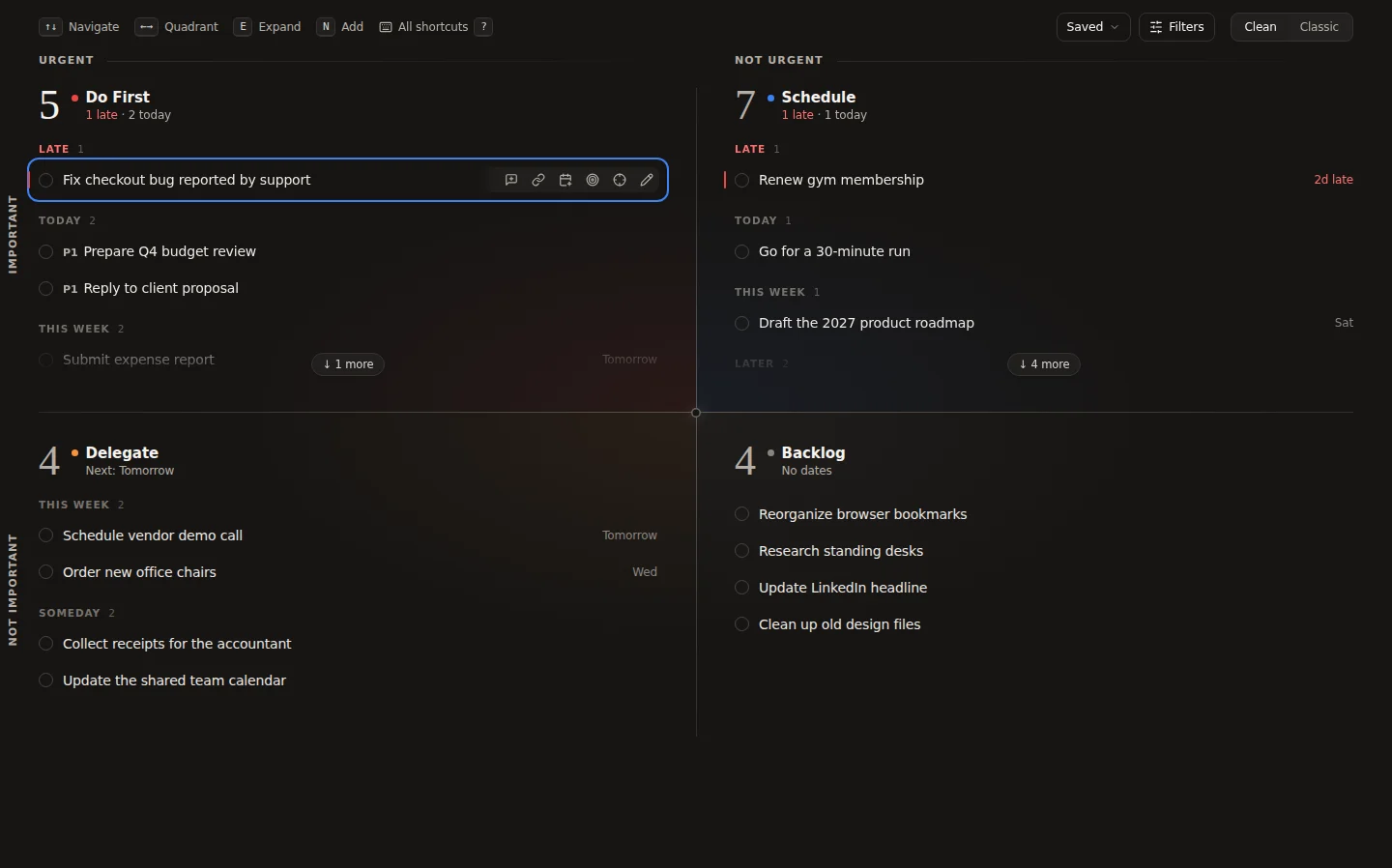
Read the step-by-step guide to using the Eisenhower Matrix with Todoist, browse every feature, or check the FAQ for pricing and data questions.